Defend Your Base From Scary Worm How to Redeem Codes
A typical Roblox codes UI, where to hunt for one in this HUD, and why strings fail.
Defend Your Base From Scary Worm does not currently expose a codes box. That is not a missing screenshot on our side: as of September 2026 the codes hub is empty, Creator Exchange lists no keys, and the HUD that players actually use is cash, unit shops, door repair, and a boss countdown. This page still exists because every Roblox tower-defense title eventually grows a Twitter/Codes button, and you should know where to look in this game instead of following a tutorial filmed in a different worm title.
If you only want the live list, stay on the codes hub. If you want the like-and-join bonus that the description already promises, skip the box hunt and open group rewards. The rest of this guide is the redemption checklist we will follow the day a string is real.
Confirm you are in the right place
Before you hunt a button, confirm the experience:
- Title: Defend Your Base From Scary Worm
- Group: Evil Worm Simulator (verified), owner TreeTrunk_290
- Place ID: 85070260180613
- Universe ID: 9812090239
The play URL on the official links page includes that place ID. If the address bar shows a different number, you are not in this wiki’s game. Codes, group rewards, and even the wooden-door loop will not match. Defend Your Base from 67, Find the Scary Worm, and generic “scary worm” copies are the usual mix-ups.
You can redeem (or look for a box) from any plot on a 35-player co-op server. You do not need a private server. You do need to finish loading far enough to see cash — new accounts start around 450 — because some Roblox games hide shop and codes buttons until the tutorial prompt closes.
Where a typical Roblox codes UI lives
Most Roblox experiences reuse one of four patterns. When this game adds a box, it will almost certainly be one of these:
- A Twitter / Codes button on the left or right of the HUD, often a bird icon, a gift box, or the word Codes. Tap it, get a text field, paste, confirm.
- A tab inside the shop. Open the cash or gem shop, look for Codes, Redeem, or Promos next to exclusive crates.
- The hamburger / settings menu. Three lines or a gear near the top of the screen, then a Redeem row under music and graphics.
- A mail or event popup after a patch. The 3 September 2026 update did not ship one; a future updates note might.
Walk those four surfaces in that order. Do not empty your backpack looking for an NPC. This is a plot-and-door tower defense on a night-grass map with a concrete bunker, not an open-world RPG with a gift vendor.
Where to look in this HUD today
Footage of this exact place shows:
- Cash in the early hundreds after you claim a base.
- Purchase options for spear throwers, money printers or farms, mortars, and later a blue high-tier unit around 16,000 cash.
- A wooden door you repair; keep it near 400 HP or the run ends.
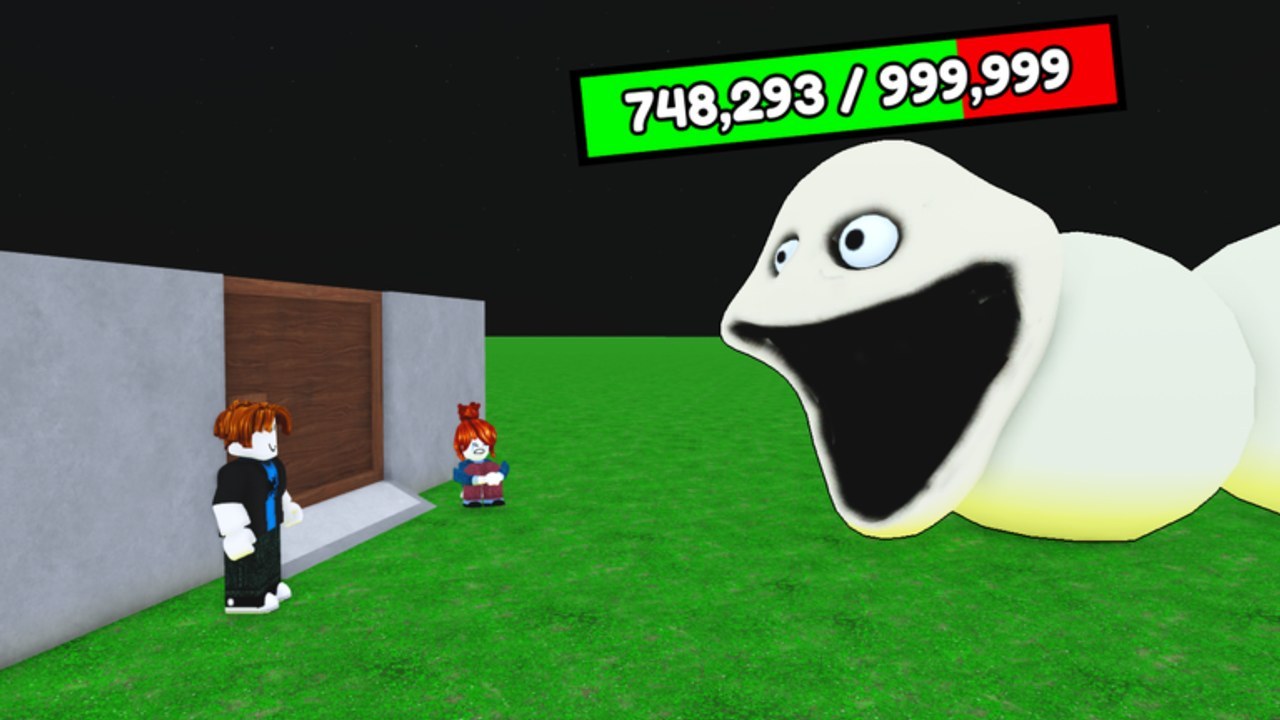
- A worm HP bar that can read like 748,293 / 999,999 — that is the worm, not the door.
- A ~25 second “releasing boss” countdown on later waves (wave 13 is a common callout).
None of those widgets is a codes field. If a creator circles the worm bar and calls it a redeem prompt, they misread the UI. The codes box, if added, will be a text input, not a health readout.
Spend your first minute in a lobby doing a slow pan of the corners and the shop tabs. If you still see nothing, there is nothing. Go play: printers, spears, door repair. Come back after the next patch listed on updates.
How you would redeem a string
When a code is posted and a box exists, the steps are boring on purpose:
- Copy the string from the codes hub table, not from a thumbnail.
- Switch to Roblox on the same account you want the reward on. Codes are per account, not per plot and not per co-op squad.
- Join place 85070260180613 and wait until cash is visible.
- Open the Codes / shop / settings control you found above.
- Paste. Do not retype if you can avoid it — O vs 0 and extra spaces are the usual kills.
- Confirm. Wait for a success toast before you close the menu.
- Check cash, gems, or crate inventory. If the reward is a unit, look at the shop or hotbar, not the worm HP bar.
If the game is in a boss countdown, redeem after the wave. A 25-second “releasing boss” window is a bad time to have a modal sitting on the repair button.
Why codes fail
When (not if) the first public string fails for someone, it will be one of these:
- No box yet. You cannot redeem air. That is today’s state.
- Wrong game. A 67 code, a Find the Scary Worm code, or a zombie-base code.
- Expired or patched out. Milestone keys die when the event ends.
- Already claimed. Limited codes and one-per-account codes reject a second paste.
- Typos, spaces, wrong case. Paste from the hub.
- Offline or mid-teleport. Wait until you have a claimed base and a live cash readout.
- Group-only keys. Some Roblox games require you to join the group first. Do that on group rewards anyway; it is the bonus that already exists.
A failed redeem does not repair the door and does not spawn the blue unit. If the toast says invalid, stop spamming. Check the hub status column. If we still mark the code Working, note the exact error text and the place ID — that is how we catch a silent expiry.
What not to do
Do not buy a “code generator,” do not paste a loadstring that claims to unlock codes, and do not trade your password for a crate key. Promo codes, when they exist, are free strings typed in an official box. Anything that asks you to download an extra program belongs on the scripts hub risk pages, not here.
Do not skip getting started while you wait for a box. The first 450 cash, the printer, and a door held near 400 HP are the actual onboarding rewards. A future code might add gems or crate rolls on top; it will not replace the worm-heal problem.
When a box finally appears, we will add a mid-page note on this guide with the exact button label from this HUD. Until that screenshot exists, treat every “how to redeem” video that shows Forest, Desert, Freezer, or Lava maps as a different game. Those biomes are not in Defend Your Base From Scary Worm.
If a string fails, screenshot the toast, the cash readout, and the place ID in the Roblox menu before you close the server. That three-frame set is what we need to mark a code Expired on the codes hub instead of arguing with a comment section. Keep the like-and-join steps on group rewards done so a later group-gated key does not bounce.
Frequently Asked Questions
Quick answers to the most common questions.
Where is the codes button in Defend Your Base From Scary Worm?
There is no confirmed codes button as of September 2026. Check HUD corners, shop tabs, and settings after each patch. If nothing is there, nothing is live.
Can I redeem a code in any server?
Yes, once a box exists. Use a normal 35-player co-op server on place 85070260180613. You do not need a private instance.
Why did my code say invalid?
Wrong game, expired key, already claimed, extra spaces, or there is still no box. Compare the string to the codes hub table.
Do I need to join the group before redeeming?
Not for a normal public code, but some Roblox games gate keys. Join Evil Worm Simulator anyway for the group rewards bonus.
Is the worm HP bar a redeem prompt?
No. A readout like 748,293 / 999,999 is the Scary Worm’s health, not a codes field. A redeem UI is a text box.
Should I redeem during the boss countdown?
Wait. The ~25 second “releasing boss” window is when you should be repairing the door, not sitting in a modal.